Intro
We’ll be using
yml/yamlformat for all examples down below, I recommend usingymlovertomlas it is easier to read.You can find any YML to TOML converters if necessary.
Assets (js/css)
The following is enabled by default
- minification - makes the assets size smallest as possible.
- bundling - bundles all the styles in one single asset
- fingerprint/intergity check.
Default Theme light/dark/auto
| |
Theme Switch Toggle (enabled by default)
Shows icon besides title of page to change theme
To disable it :
| |
You can refer following table for better understanding…
defaultTheme | disableThemeToggle | checks local storage? | checks system theme? | Info |
|---|---|---|---|---|
auto | true | No | Yes | only system theme |
| false | Yes (if not->2) | Yes (2) | switch present | |
dark | true | No | No | force dark only |
| false | Yes | No | switch present | |
light | true | No | No | force light only |
| false | Yes | No | switch present |
Archives Layout
Create a page with archive.md in content directory with following content
.
├── config.yml
├── content/
│   ├── archives.md   <--- Create archive.md here
│   └── posts/
├── static/
└── themes/
    └── PaperMod/
and add the following to it
---
title: "Archive"
layout: "archives"
url: "/archives/"
summary: archives
---
Note: Archives Layout does not support Multilingual Month Translations.
ex: archives.md
Regular Mode (default-mode)

Home-Info Mode

Use 1st entry as some Information
add following to config file
params:
  homeInfoParams:
    Title: Hi there wave
    Content: Can be Info, links, about...

  socialIcons: # optional
    - name: "<platform>"
      url: "<link>"
    - name: "<platform 2>"
      url: "<link2>"
Profile Mode
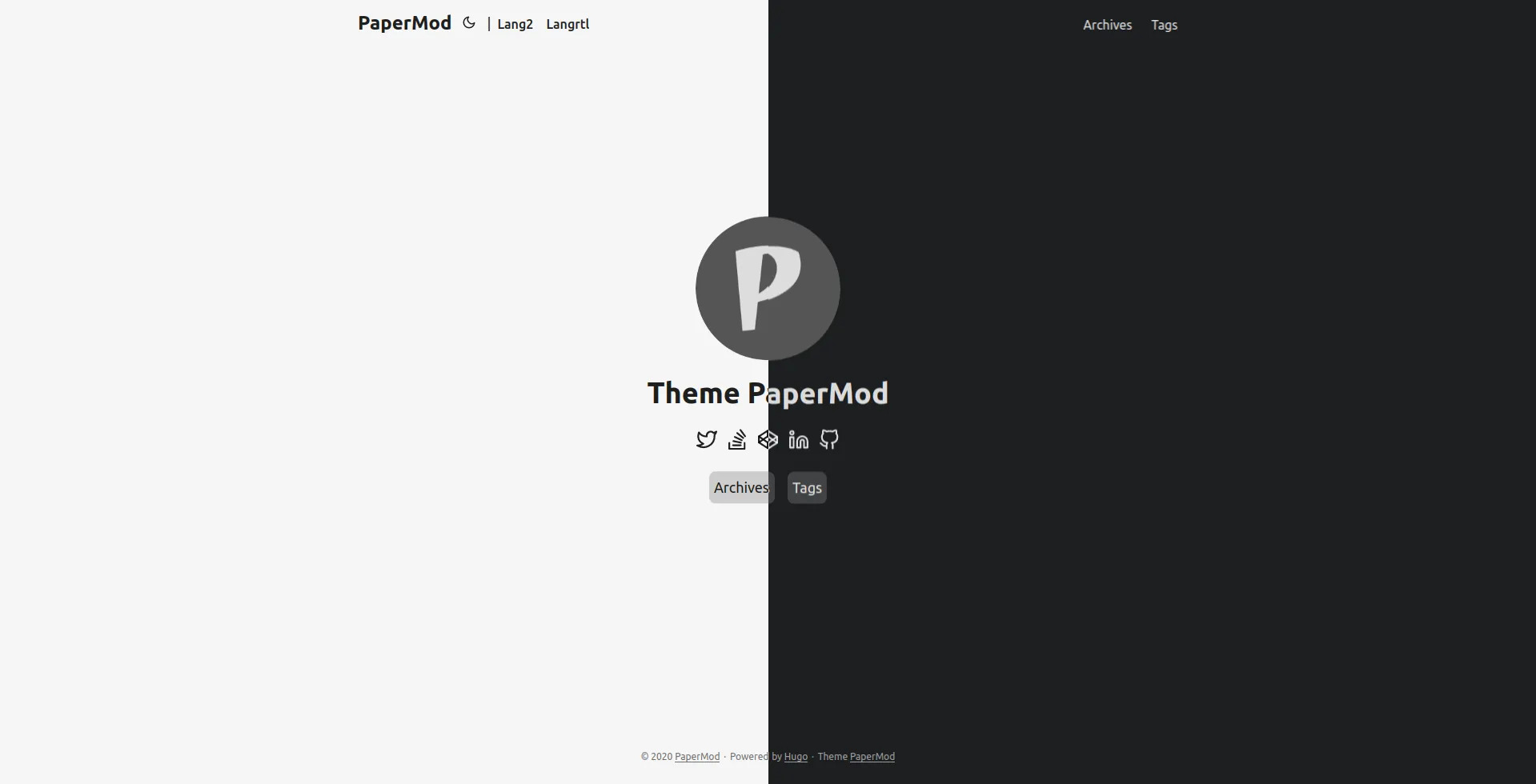
Shows Index/Home page as Full Page with Social Links and Image
add following to config file
| |
Search Page
PaperMod uses Fuse.js Basic for search functionality
Add the following to site config, config.yml
| |
Create a page with search.md in content directory with following content
| |
To hide a particular page from being searched, add it in post’s frontmatter
| |
ex: search.md
Search Page also has Key bindings:
- Arrow keys to move up/down the list
- Enter key (return) or Right Arrow key to go to the highlighted page
- Escape key to clear searchbox and results
For Multilingual use search.<lang>.md ex. search.es.md.
Note: Search will work only on current language, user is currently on !
Customizing Fusejs Options
Refer https://fusejs.io/api/options.html for Options, Add those as shown below.
| |
Draft Page indication
adds [draft] mark to indicate draft pages.
Post Cover Image
In post’s page-variables add :
| |
When you include images in the Page Bundle
, multiple sizes of the image will automatically be provided using the HTML5 srcset field.
To reduce generation time and size of the site, you can disable this feature using
| |
To enable hyperlinks to the full image size on post pages, use
| |
Share Buttons on post
Displays Share Buttons at Bottom of each post
to show share buttons add
params:
  ShowShareButtons: true
Show post reading time
Displays Reading Time (the estimated time, in minutes, it takes to read the content.)
To show reading time add
Params:
  ShowReadingTime: true
Show Table of Contents (Toc) on blog post
Displays ToC on blog-pages
To show ToC add following to page-variables
ShowToc: true
To keep Toc Open by default on a post add following to page-variables:
TocOpen: true
BreadCrumb Navigation
Adds BreadCrumb Navigation above Post’s Title to show subsections and Navigation to Home
params:
  ShowBreadCrumbs: true
Can be diabled for particular page’s front-matter
---
ShowBreadCrumbs: false
---
Edit Link for Posts
Add a button to suggest changes by using the file path of the post to link to a edit destination.
For site config use:
Params:
  editPost:
    URL: "https://github.com/<path_to_repo>/content"
    Text: "Suggest Changes" # edit text
    appendFilePath: true # to append file path to Edit link
Can be modified for individual pages
---
editPost:
  URL: "https://github.com/<path_to_repo>/content"
  Text: "Suggest Changes" # edit text
  appendFilePath: true # to append file path to Edit link
---
The example above would yield the following link for the post file posts/post-name.md:
https://github.com/<path_to_repo>/content/posts/post-name.md
| Parameter | Required | Default Value |
|---|---|---|
editPost.URL | true | - |
editPost.appendFilePath | false | false |
editPost.Text | false | Edit |
Since the link generated is a regular HTML anchor tag <a href=...>, you can
also use other URL schemas like mailto://, e.g.
URL: "mailto://mail@example.com?subject=Suggesting changes for "
Other Posts suggestion below a post
Adds a Previous / Next post suggestion under a single post
params:
  ShowPostNavLinks: true
Code Copy Button
Adds a copy button in code block to copy the code it contains
params:
  ShowCodeCopyButtons: true
Multiple Authors
To Use multiple authors for a post, in post-variables:
---
author: ["Me", "You"]
---
To use Multiple Authors Site-wide, in config.yml:
params:
  author: ["Me", "You"]
Comments
to add comments, create a html file
layouts/partials/comments.html
and paste code provided by your comments provider
also in config add this
params:
  comments: true
read more about this hugo-comments
AccessKeys
c - ToC Open/Close
g - Go To Top
h - Home (according to current lang)
t - Theme toggle
/ - Jumps to search page if in menu
Enhanced SEO
Enabled only when env: production
Twitter Cards Support
- The Twitter Cards metadata, except
twitter:imageshould not require additional configuration, since it is generated from metadata that you should already have (for instance the page title and description). - The
twitter:imageuses the Post Cover Image , if present. - In the absence of a cover images, the first image from the
imagesfrontmatter (a list) is used.images: - image_01.png - image_02.png - Finally, if neither of those are provided,
twitter:imagecomes from the first Page Bundle image withfeaturein the name, with a fallback to the first image withcoverorthumbnailin the name.
OpenGraph support
- The OpenGraph metadata, except
og:imageshould not require additional configuration, since it is generated from metadata that you should already have (for instance the page title and description). - The
og:imageuses the Post Cover Image , if present. - In the absence of a cover images, the first image from the
imagesfrontmatter (a list) is used.images: - image_01.png - image_02.png - Finally, if neither of those are provided,
og:imagecomes from the first Page Bundle image withfeaturein the name, with a fallback to the first image withcoverorthumbnailin the name. - For pages, you can also add audio (using frontmatter
audio: filename.ext) and/or videos.videos: - filename01.mov - filename02.avi
Multilingual Support
Misc
Scroll-Bar themed (by default)
Smooth Scroll between in-page links (by default)
Scroll-to-Top Button (by default)
Displays a Scroll-to-Top button in right-bottom corner